Plan your Instagram grid
before you post
Use a free instagram grid planner to preview a true 3-column profile. This instagram grid planner helps you drag-and-drop your next 9–15 posts and export a PNG grid preview before you publish. This grid planner is local-first: no signup, no uploads.
Try this:
Plan a 9-post launch grid for my new collection...|
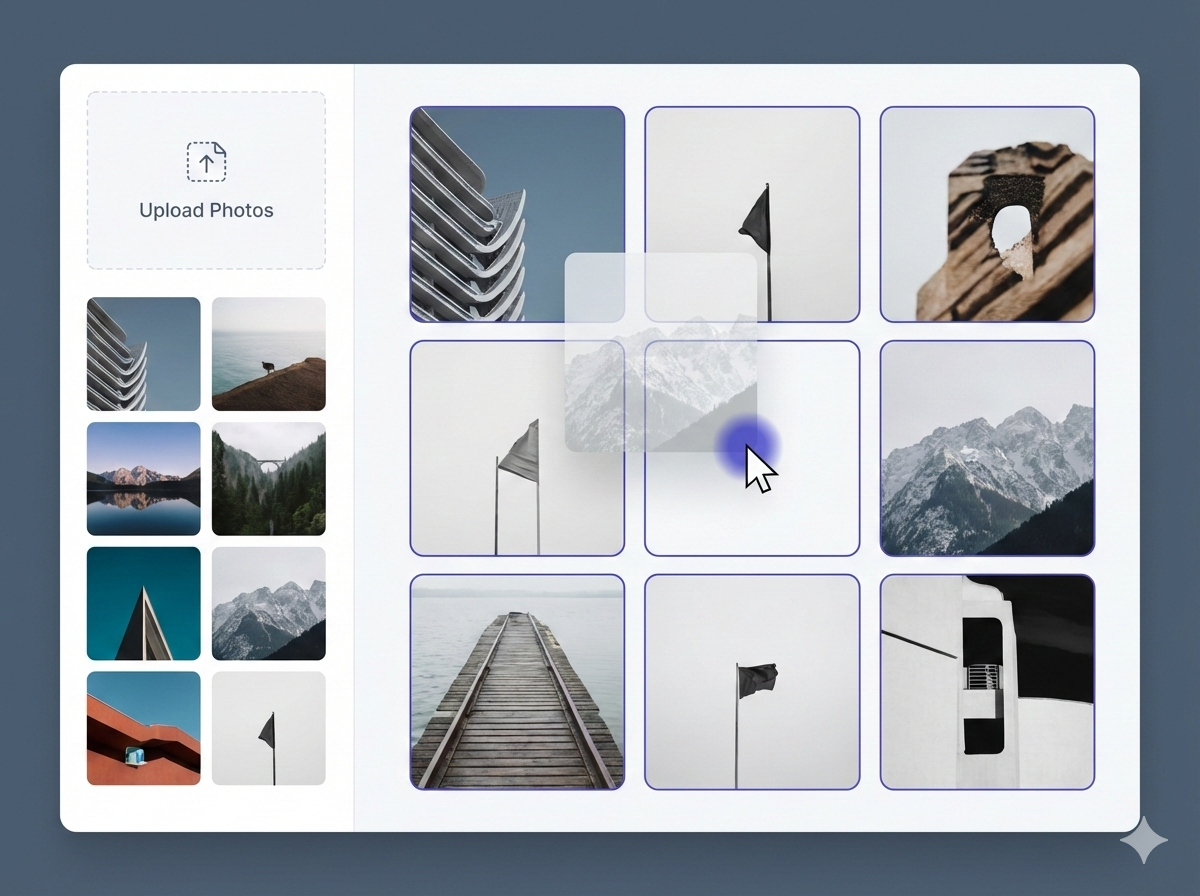
3-column grid preview
See your profile layout before you post with an instagram grid planner
Drag & drop reorder
Move tiles to find the perfect order in the instagram grid planner
Export PNG
Download your planned grid in one click from the instagram grid planner
Local-first privacy
Your images stay on your device while you use the instagram grid planner
Instagram Grid Planner
A free instagram grid planner that works as a fast grid planner: upload images, drag-and-drop to reorder, and preview your instagram grid before you publish.
Privacy: your images stay on your device. Nothing is uploaded. This instagram grid planner runs locally in your browser.
Add photos
Drag & drop images here
Or click Upload to browse
How this helps
- Keep a consistent aesthetic across your profile with an instagram grid planner
- Plan campaigns, launches, and series posts
- Avoid awkward color clashes and layout surprises
Everything You Need in an Instagram Grid Planner
Upload, preview, reorder, and export — a simple instagram grid planner. This instagram grid planner works as a fast grid planner for creators, brands, and agencies.
True-to-Instagram Grid Preview
See a clean 3-column profile preview before you post anything. The instagram grid planner shows how tiles look together.
- 3-column layout preview
- Preview next 9/12/15 posts
- Square crop preview (cover-style)
- No account required
Aesthetic Planning Tools
Plan themes, color flow, and layout patterns visually with an instagram grid planner.
- Drag-and-drop reorder
- Try checkerboard & series layouts
- Avoid awkward color clashes
- Iterate in seconds
Fast Export
Export a PNG snapshot of your planned grid in one click with the instagram grid planner.
- High-resolution PNG export
- Works great for reviews & approvals
- Share with clients or teammates
- No watermarks
Local-First Privacy
Your photos stay on your device. Nothing is uploaded. The instagram grid planner is local-first.
- No signup, no login
- No cloud storage
- No hidden uploads
- Clear in one click
Built for Real Workflows
Perfect for creators, brands, and agencies managing content series with an instagram grid planner.
- Plan campaigns & launches
- Design a consistent brand grid
- Preview before scheduling
- Reduce last-minute changes
Built For Everyone
Whether you're a creator, a brand, or an agency — plan your grid faster and publish with confidence.
Key Benefits:
Brand Marketers
Use your Instagram profile like a storefront — polished and consistent.
Start PlanningKey Benefits:
Key Benefits:
Ready to plan your next instagram grid?
Start with an instagram grid planner free in your browser. This free instagram grid planner keeps your images on your device.
How This Instagram Grid Planner Works (3 Simple Steps)
A fast instagram grid planner workflow — upload, preview, drag-and-drop reorder, then export a PNG. Use this instagram grid planner free to plan content for creators, brands, and agencies.
Upload Your Photos
Add your upcoming posts to see how they look together.
Example:
Drop 9–15 images to preview your next posts.
- Drag & drop images or browse files
- Works on desktop, tablet, and mobile
- No login required
- Local-first: images stay on your device
Preview Your Grid
See a clean 3-column profile preview before you publish.
Example:
Switch between 9/12/15 to match your planning horizon.
- Choose Next 9 / 12 / 15 slots
- Spot awkward transitions early
- Plan color palettes and themes
- Keep your feed consistent
Reorder & Export
Drag tiles to reorder, then export a PNG snapshot.
Example:
Export PNG and finalize your posting order.
- Drag & drop tiles to reorder posts
- Export a clean PNG grid preview
- Share with clients or teammates
- Clear everything in one click
Ready to Plan Your Next Grid?
Start free in your browser. Your images stay on your device.
Still Have Questions?
Need to register?
No signup required. Your images stay on your device.
Mobile support?
Works great on modern phones, tablets, and desktops.
Can I export?
Yes — export a PNG grid snapshot to share or review.
Instagram Grid Planner FAQ (Free Grid Planner & Feed Preview Tool)
Looking for a free Instagram grid planner? Here are detailed answers about how our Instagram Grid Planner works, how to export your grid preview, and why a grid planner helps you plan a consistent Instagram feed — on instagramgridplanner.com.
Getting Started
To use our Instagram Grid Planner (a free instagram grid planner), scroll to the Planner section on instagramgridplanner.com, upload your photos, and you’ll instantly see a 3-column grid preview like your Instagram profile. Then drag-and-drop to reorder posts until the layout looks right, and export a PNG grid snapshot for review. This instagram grid planner free tool runs in your browser and does not require signup or login.
Features
Security & Privacy
Usage
Still Have Questions?
If you didn't find the answer you're looking for, we'd love to hear from you.
Plan Your Instagram Grid
With a Free Instagram Grid Planner
Upload, preview, and reorder your next instagram grid in minutes — then export a PNG from this instagram grid planner.
instagram grid planner free — no signup, images stay on your device.
"Finally, a fast instagram grid planner to preview my feed before posting."